
Payment reminder messages you can adapt
Remind a customer of a due date, follow up on an overdue invoice or confirm a partial payment. Start with an example, then personalize it with your invoice details.
Prepare a message with your invoice detailsRequest a payment or confirm money received. Review the balance and the English message before copying it.
Choose the language for the controls and explanation. The message for your customer stays in English.
Meaning
- Invoice total
- Received
- Remaining balance
Your details are prepared here. You choose whether to copy or share the message and who receives it.
See an invoice after a partial payment
A PARTIAL PAYMENT, WITH NUMBERS
Keep the total. Reduce the balance.
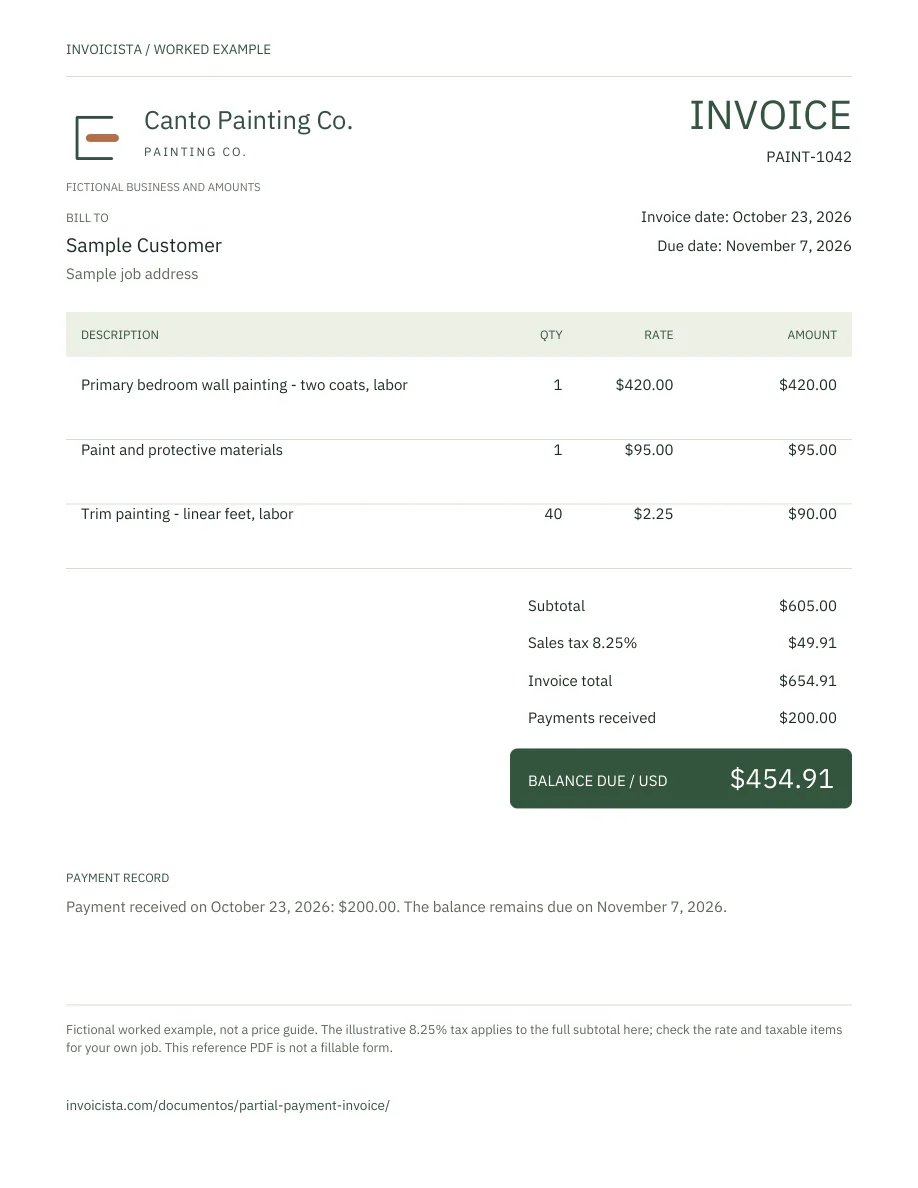
The invoice totals $654.91: a $605.00 subtotal and $49.91 illustrative tax. After receiving $200.00, $454.91 remains outstanding.
- SubtotalSubtotal
- $605.00
- Illustrative tax · 8.25%Sales tax
- $49.91
- Original totalInvoice total
- $654.91
- Payments receivedPayments received
- − $200.00
- Remaining balanceBalance due
- $454.91
- Payment received in the example
- Agreed balance due date
$654.91 − $200.00 = $454.91
The illustrative 8.25% tax applies to the full subtotal in this fictional example. Check the rate and taxable items for your job. Subtract a deposit only after receiving it; for multiple payments, add the money received for this invoice.
Change the received payment and check the balance →
View the complete invoice here
Zoom and scroll to read the details. You can use the arrow keys when the document has focus.
The preview could not load. Use the file download link.
If the due date has passed: review the same balance as overdue →