
Job estimate template: PDF and example
Prepare an English estimate for a service job in the United States. Download the blank PDF, review a painting example and check your proposed amounts. No account needed.
Fillable PDF · 1 page · manual amounts
On this page
BEFORE INVOICING
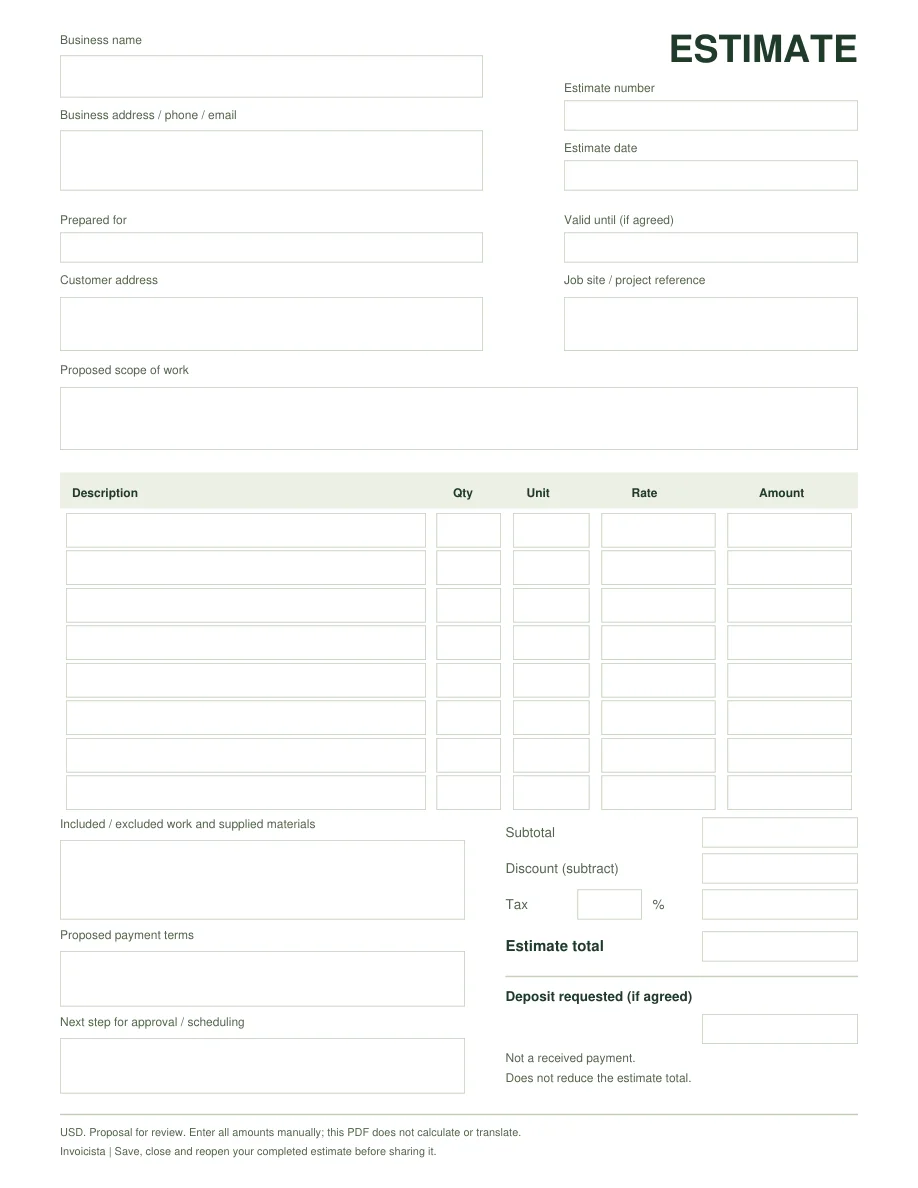
Fillable English estimate template
Start with your own proposed scope and prices. The PDF has eight line items with quantity, unit, rate and amount, plus validity, exclusions and a requested deposit separate from the total.
Fillable PDF · 1 page · English · USD
Fill it in manually: it does not calculate or translate. No account is needed to download it.
Examine the template before downloading
Zoom and scroll to read the details. You can use the arrow keys when the document has focus.
The preview could not load. Use the file download link.
How to complete and save your estimate
Identify the proposal and scope
Fill in Estimate number, Estimate date and Prepared for. Describe the proposed work under Proposed scope of work. Enter Valid until if you agreed a validity period; this is different from an invoice payment due date.
Match each quantity to a unit
For Qty and Unit, use 1 job for a complete job, hour for hourly work or linear ft for work priced by length. Rate must match that unit. Do not multiply a fixed job price by a quantity already included in that price.
Keep the total and deposit request separate
Enter Subtotal, Discount, Tax and Estimate total manually. Confirm the applicable tax and taxable items. Deposit requested is the proposed advance payment: it does not reduce the estimate total or confirm money received.
Explain the terms and check the saved file
State supplied materials, exclusions, payment terms and how the customer should respond to approve or schedule the work. Save, close and reopen the completed PDF. Some mobile viewers require downloading it and opening it in an app that supports PDF forms.
The worksheet starts blank. Enter your own line items or load the fictional painting estimate. It does not translate your descriptions or fill in the PDF for you.
BEFORE THE CUSTOMER APPROVES THE WORK
Did the customer ask for a quote or an estimate?
Both names are used for a proposed job and price before invoicing. Explain what the price covers, what is excluded and how a change should be approved.
- Quote
- A price you offer for a defined scope. Confirm the tasks, materials, exclusions and approval process.
- Estimate
- A proposed scope and price. State which amounts are agreed and which depend on measurements or changes.
- Invoice
- A document requesting the payment due under your agreement, such as a deposit, stage or final payment. Check the balance and due date.
When the customer asks for an estimate instead of an invoice
- Check the stage of the job. If the customer is still reviewing the price, present a proposal. If an agreed deposit, stage or final payment is due, confirm which information or document they need to process it.
- Prepare the appropriate document. In Invoicista, choose the estimate document type and review scope, quantities, rates and exclusions. Renaming an invoice you already sent does not review those details for you.
- Keep the approval and actual payments. Requesting a deposit does not mean you received it or reduce the proposed total. When invoicing is due, check what was agreed and any money already received.
State whether the price holds for the described scope and how it will be reviewed if the work changes. Keep the proposal and the customer’s approval.
Review the painting estimate · $654.91This example excludes wall repairs. If the customer adds them, check a revised price with two wall repairs and agree the additional work before proceeding.
References on proposing a job before invoicing: Xero: quotes · Quicken: estimates / quotes.
ESTIMATE EXAMPLE · FICTIONAL DETAILS
An estimate proposes the price before you bill.
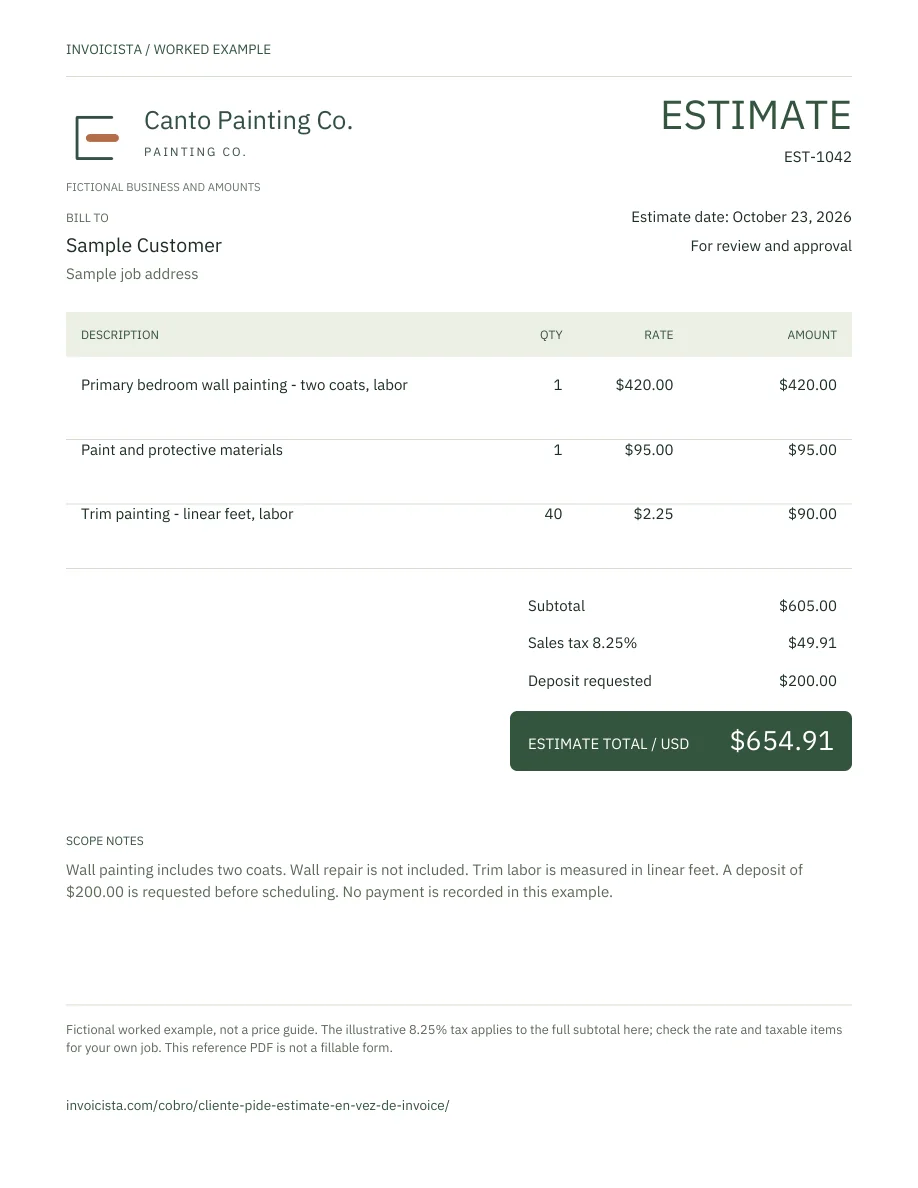
Before the customer approves the work, this estimate lists three painting items and illustrative tax separately. The requested deposit does not reduce the proposed price or count as money received.
| Description in English | Quantity | Unit rate | Amount |
|---|---|---|---|
| Primary bedroom wall painting - two coats, labor | 1 | $420.00 | $420.00 |
| Paint and protective materials | 1 | $95.00 | $95.00 |
| Trim painting - linear feet, labor | 40 | $2.25 | $90.00 |
Wall painting and materials are proposed as complete job items. Trim is measured in linear feet: 40 × $2.25 = $90.
- Subtotal
- $605.00
- Illustrative tax · 8.25%
- $49.91
- Proposed total
- $654.91
- Deposit requested, not yet received
- $200.00
- Payment received in this example
- $0.00
The illustrative 8.25% applies to the full subtotal in this example. Confirm the rate and taxable items for your own job. Wall repairs are excluded; agree any scope change before continuing.
Open the complete estimate PDFChange line items and check the calculation →
Examine the document here
Zoom and scroll to read the details. You can use the arrow keys when the document has focus.
The preview could not load. Use the file download link.
Before sending it
- Check services, quantities, materials and exclusions with the customer.
- Agree the price, deposit and payment timing before requesting payment.
- If money arrives, verify the payment and keep its record. A request alone does not confirm a payment.
When it is time to invoice, compare the invoice for the same job with your approved estimate.
If you have already received part of an invoice payment, review the partial payment example. To request the deposit, prepare a message with your own details.
Check the amounts for your template
Calculate up to 12 line items in US dollars before entering the totals in the PDF. Your entries stay on this page and disappear when you close or reload it. Use the print preview to keep the breakdown.
Your case is selected. Choose “Load example” to check its amounts and change them.
Checked amounts
- Subtotal
- Fixed discount · USD
- Calculation base
- Tax
- Invoice total
- Payments already received · USD
- Balance due
Each line item is rounded to cents. Subtotal − discount = base; base + tax = total; total − received payments = balance.
Descriptions keep your original wording. Fill in the PDF fields separately.
Copy the amounts into the matching PDF fields and save the file. This worksheet does not create or save an invoice.